
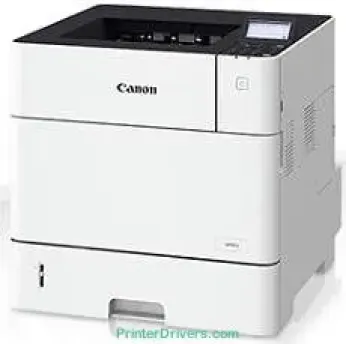
Il modello Canon i-SENSYS LBP352x è un dispositivo monocromatico che offre stampe di qualità. Utilizza la tecnologia di stampa laser monocromatica per produrre stampe di qualità eccellente. Supporta sia la stampa solo fronte (modalità simplex) sia quella fronte-retro (modalità duplex). In modalità simplex, la velocità di stampa arriva fino a 62 pagine al minuto (ppm) su carta A4.
Download dei driver per Canon i-SENSYS LBP 352x per Microsoft Windows 32-bit – 64-bit e Macintosh Operating System.
Cartucce toner supportate
Cartuccia toner nero 039: circa 11000 pagine
Driver Canon i-SENSYS LBP352x per Windows
7eb83d82d729c610fb3aa3ac411cdcfefcd347a0d5a672a71de5b08a0d64577035c4bb76f89cb6e07c92ce121cd3c69b7d7d336e6e623eb8f16630a345d75fb2bf31a4352cf32fa0d8e891013683895e8847cd8e45ec7e67cee6cbd139d15bf460f2bacd3e1a067ac20273427c5da36dd6b617c17cd182f7568bee59937ac1494440d38430f90fcffc716e1b21f6acd10e0c1f5fdaa4bfcfdb4bcd957fcf89bc9392ac4854b6611280a41af3b0273a86f621eaf21a1b98f60bb72df9a27a7508443586ca6d538a0ef5ddea5cb22db9c19a6e312885460e262c69793b2ffdd0e88ca59880d1cb5901be647cdf1caea23c100983180f08882aa439e2bb80f0478b9e0a235803be9f47a5d243d9335d0f9156f4db43c0d73229137365945e3a335e484d887fc334579b3dc3a8bc75da393a9e3965472a7d23778e61bd2de5b0bee204d2e8b6f97ecdbf6149ef728dccd1e27a7ad604327a8fa2972b7d5b6323ac320f9c6406c46b234f582a575d1581efe532fa405c5390a18408e0a3cd074c9611c60ae7abde74362ee1fc65c30bd9d6dbd210613ae7713e332cb28ca73d2602ceDriver Canon i-SENSYS LBP352x per macOS
c3e86cfd6f247d81eb37a4c36412fc22f6df2225ec39bf8c25639c777857c490d4979c95b95f86afe7d82e361835ffeee1a5b7584d6eab4aa4bcd545d8b8d9573cac8d47a0bb1580e74b492bc876858781092e8fae8a009946dc72a2194c0ca96b581313eec6df01b8ad51715b70513f5b2a2cb26467a41d34966d7b57f74f963accb0f153300092a2ee312825c851035f1c66d65dafd67c77e2d4fbcd27c13a312dad7b42625ee423180149805c7ec4e10d238d7ee98b777e766374df0576c8ab8f0f303177d8c2129a2a2db2b478c6b63e40154d669f8d01041b4f7afcfbb1afa07a120e13f388f25264155b97228b6378ddc7bc4138e34904c730a8b43dcb01a221888cc3651a64f633e461870d1e2d0cce0ef54abb9c8317ca085ad2196494292469e0acf79d6f42d1ee69f08969d05241d73a3b0845a32aaa2fe1c08f5d22777e10690dcebdae80b6ec50e7bed2b28b71ca4cf9315646912ab2ad21c066702b8d833f5f41ec87cd5b357b1b9ddd3bb3d1b09a3768321db602239d777492Driver Canon i-SENSYS LBP352x per Linux
51cab752fad9bcd5379320c7d0d092b90e67c30b336c1776bfe4ea74b03c2634Specifiche tecniche di Canon i-SENSYS LBP352x
Su carta formato A5, invece, la velocità di stampa è fino a 75 ppm in modalità orizzontale. In modalità duplex, la velocità di stampa è fino a 41. 4 ipm su carta A4. La risoluzione massima di stampa è 1200 x 1200 punti per pollice (dpi), mentre quella media non supera 600 x 600 dpi. La macchina impiega circa 29 secondi o meno per riscaldarsi ed essere pronta a stampare.
Il tempo necessario per la prima stampa è di circa 7,0 secondi. In condizioni ideali, il ciclo di lavoro ottimale della macchina è fino a 280.000 pagine al mese. Il volume consigliato è compreso tra 5000 e 20000 pagine al mese. I margini di stampa sono di 5 mm su tutti e quattro i lati della carta: destro, sinistro, superiore e inferiore. Tra le funzionalità avanzate della macchina figurano la stampa protetta e la possibilità di stampare da una chiave di memoria USB.
Questa modalità supporta i formati di stampa JPEG, TIFF e JPEG. Consente inoltre di stampare codici a barre e utilizza la funzionalità Google Cloud Print ready. Le funzionalità di stampa da dispositivi mobili dipendono dal sistema operativo in uso. Ad esempio, sui dispositivi iOS sono supportati Apple Airprint e l'app Canon PRINT Business. Sui dispositivi Android, la macchina supporta Canon Print Service Plug-in e l'app Canon PRINT Business.
Dettagli tecnici
| Titolo | Driver per Canon i-SENSYS LBP352x |
|---|---|
| Tipo di dispositivo | Stampante |
| Versione del driver | Varia in base al driver e al sistema operativo |
| File disponibili da scaricare | Driver |
| Licenza | Gratuito |
| Produttore | Canon Inc. |