
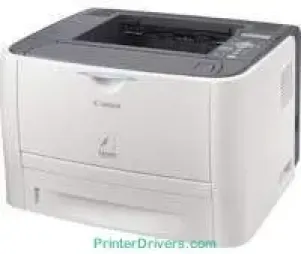
Il modello di stampante Canon i-SENSYS LBP3370 utilizza la tecnologia di stampa laser monocromatica per produrre stampe di alta qualità. I linguaggi di stampa compatibili includono PCL 6, PCL 5e e UFRII. In condizioni standard, la risoluzione di stampa è di 600 x 600 punti per pollice (dpi). La risoluzione di stampa massima è invece di 2400 x 600 dpi con la funzione di miglioramento automatico dell'immagine (AIR).
Download dei driver per la stampante Canon i-SENSYS LBP 3370 per Microsoft Windows 32-bit – 64-bit e sistema operativo Macintosh.
Dettagli della cartuccia toner – Cartuccia toner nero 715: circa 3000 pagine
Driver Canon i-SENSYS LBP3370 per Windows
9392ac4854b6611280a41af3b0273a86f621eaf21a1b98f60bb72df9a27a7508da798deb15af1d4d8858631087c974054f37598724b49fce3b71741f6261d3137d8957b07788e6be71c598dbeb19478e47a825a8b9fa0e6b15451a31ca2227469e0a235803be9f47a5d243d9335d0f9156f4db43c0d73229137365945e3a335e18f732a2a0f89fb6ca1479dfdce4987940cb59895f4eef46b309c0d132b9726a4269defb3a6f0835b30b34a70b2b6896135cc624c94d628310688b2e946fe779ccf6e2551b2b1fcbe261d318d79946e63bbd2075062a0abd051d6407d7e68885Driver Canon i-SENSYS LBP3370 per macOS
0f53fae19e0d86f5dad9e95bef02c8f9406769c635e54ac210c6d8ab9f8e11d38c3891f63d4e6b9d23a613adb34a803bd4b45593d9fc0ca658465a0aba1a7ff33cac8d47a0bb1580e74b492bc876858781092e8fae8a009946dc72a2194c0ca93accb0f153300092a2ee312825c851035f1c66d65dafd67c77e2d4fbcd27c13aab8f0f303177d8c2129a2a2db2b478c6b63e40154d669f8d01041b4f7afcfbb101a221888cc3651a64f633e461870d1e2d0cce0ef54abb9c8317ca085ad2196422777e10690dcebdae80b6ec50e7bed2b28b71ca4cf9315646912ab2ad21c066602bdd48468bf971d46227aeb5a5e80268b4d63683acc1033092bf82e239f0644c12283382997a0a253b5b7bedae90cf797892d245c51f896cbbc7eaf39f0d5bb8825494a67bc5938313fc32f3eba5a000e2537d88af0cf21342a0df4316b54dDriver Canon i-SENSYS LBP3370 per Linux
b7031f9f0aa035cbc5175cb86e3bd83d06f90673a63ea40105ffb5cc6c60237fSpecifiche tecniche di Canon i-SENSYS LBP3370
Il ciclo di lavoro di stampa massimo della macchina Canon i-SENSYS LBP3370 arriva fino a 15.000 pagine al mese. Stampa inoltre 26 pagine al minuto (ppm), in particolare con carta A4. I formati carta standard compatibili includono A4, A5, B5, legal, letter, executive, buste, monarch e formati personalizzati. Il peso della carta supportato è compreso tra 64 e 163 gsm per tutti i vassoi. Il vassoio principale può contenere fino a 250 fogli di carta comune.
Il vassoio multifunzione può contenere fino a 50 fogli di carta comune. È inoltre disponibile un vassoio opzionale con una capacità di 250 fogli. Il vassoio di uscita può contenere fino a 125 fogli stampati, con il lato stampato rivolto verso il basso. La macchina può anche produrre un foglio con il lato stampato rivolto verso l'alto. La memoria interna di questo dispositivo è di 64 MB di RAM. Tra i modelli di cartuccia compatibili con questa macchina figurano la cartuccia 715 e la cartuccia 715H.
La prima può stampare fino a 3000 pagine, mentre la seconda può stampare fino a 7000 pagine di documenti. Per collegare il dispositivo, gli utenti possono utilizzare un connettore USB 2.0 hi-speed o una porta Ethernet LAN 10/100Base-T/TX. Il peso netto del dispositivo è di circa 11,4 kg, senza cartuccia installata.
Dettagli tecnici
| Titolo | Driver per Canon i-SENSYS LBP3370 |
|---|---|
| Tipo di dispositivo | Stampante |
| Versione del driver | Varia in base al driver e al sistema operativo |
| File disponibili da scaricare | Driver |
| Licenza | Gratuito |
| Produttore | Canon Inc. |