
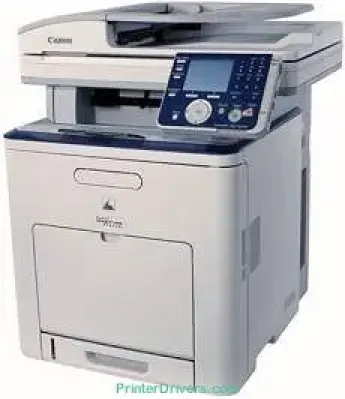
La stampa con il modello Canon imageCLASS MF8450c offre risultati a colori e in monocromia di alta qualità. La stampante utilizza inoltre la tecnologia di stampa laser a colori. La velocità di stampa dei documenti a colori e in monocromia può raggiungere 17 pagine al minuto (ppm). Questo valore si applica però all'uso della carta in formato lettera. La risoluzione di stampa può raggiungere 600 x 600 punti per pollice (dpi).
Download dei driver Canon imageCLASS MF8450c per Windows 32-bit – 64-bit e per Mac.
Dettagli sulle cartucce toner
Cartuccia toner nera 117: resa fino a 6000 pagine
Cartuccia toner ciano 117: fino a 4000 pagine
Cartuccia toner magenta 117: circa 4000 pagine
Cartuccia toner gialla 117: resa fino a 4000 pagine
Driver Canon imageCLASS MF8450c per Windows
8efb6161178da01d79d6c01a0d7580f023b8f48eaef578f105c978726b6b00746b60707db5c4a5d6af427c68f221758bf0b24d9c1dd03e07237edf442972c83190717826c5ec8bb3524546746b4ba39c6ae35e6f25737c5e294f356dd7875ccffed6a6d44f04227dda23cdfae320070aeabe23a20a3b308f5bcd953f237b2486083c19754284db2ff3f9d1ccd9a9f544276e8cdf6dbf499bbd1b38a9b43ada81d713d828cdebc7804384d9ae9e4272ca5bdc382062df9b7f362f61801111980ec2eaa283de1e130d72a4e6ac45bf80cc7be72fe4a2e2c826c4ef667dcec53563649bf8e02d19224f1c9760e1023a124b469a28dfbdcda08131b07139dd8367ddDriver Canon imageCLASS MF8450c per macOS
0f53fae19e0d86f5dad9e95bef02c8f9406769c635e54ac210c6d8ab9f8e11d3503619d05f501b7a04c15b3f849f415878d501725df252139d81841280c628e88c3891f63d4e6b9d23a613adb34a803bd4b45593d9fc0ca658465a0aba1a7ff3a2f4cd0e35483928ff487a3267ea5c930711de5d487220a3d3402f65c263e8e6120127e629c21787113c325d0a39041678f71d4a9f42e666ef90388f0c0584b569ef5f30da4c92762d2a5b614957892f1b542e16a07d53fec92f92bc3051fe32edd8dcff2593c749a946c421f8d3b7484ca2059b0e42799acf81f74ccc168efec5875b37125b8c8a32cad84148bab04417f7abf39551d213d21db0084be432cc5c70ce408e9af249acb1d961605a3c4e4741913910cc53c3a562af0ca8c76e6e0297641744ea447acd804af112d0693e6588ba52e03feaf0d3150446eb3e84f53d1cdceea84a542a2f3a87260766b5c9361b29b64316e7ff24d6a98a6826c68dcd403b42f9117b3534b580cc059e657ae4f18497b4b9c846bd39602446daae2822777e10690dcebdae80b6ec50e7bed2b28b71ca4cf9315646912ab2ad21c0669dd3f1b1c7dc175ab7cd4bb929f902c55966150a6a0273dbb36ccad0f146006ac0f30b290384f17a632ab8d1bb4aaeb3589d0088456996795300daf6874e757fce4e588538376ea06d8cebe6fcce2f0feef6a769b6be9f24e7f1db99f24bb06495a8a167b29fa549e7cef6686d42491921d3db11307ee86a2b894730cbc5e9a7245023025e79196fe45e820e0d6ae054991fda6551b4a53e028cd1844354065fDriver Canon imageCLASS MF8450c per Linux
c0c2d391a4fd6e2f014a1e7e30a8cb20c7464112e1430532d3a5116f0cf648cbSpecifiche tecniche di Canon imageCLASS MF8450c
La risoluzione massima per una qualità di stampa ottimale è fino a 2400 x 600 dpi. La stampante è compatibile con le cartucce Canon modello 117 ciano, magenta, giallo e nero. La resa massima per i colori ciano, magenta e giallo è di circa 4000 pagine. La capacità massima di stampa della stampante è invece fino a 50.000 pagine in un mese.
La resa di stampa dipende inoltre dalla copertura del 5% dei documenti. Il vassoio di uscita può contenere fino a 250 fogli stampati. Per quanto riguarda la funzione di copia, la stampante può produrre copie con una risoluzione di 600 x 600 dpi. In condizioni ottimali, può copiare documenti a una velocità di 17 copie al minuto, usando carta in formato lettera. È inoltre possibile ingrandire e ridurre le immagini con incrementi dell'1%, nell'intervallo compreso tra 50 e 200%.
Il sistema di scansione della stampante utilizza un sensore CCD a colori e produce scansioni di documenti in bianco e nero con una risoluzione di 600 x 600 dpi. La risoluzione di uscita per i documenti a colori può raggiungere solo 300 x 300 dpi. Altre funzioni dello scanner includono la scansione su USB, due porte USB host con una porta Hi-Speed 2.0 e il supporto per unità flash USB.
Dettagli tecnici
| Titolo | Driver per Canon imageCLASS MF8450c |
|---|---|
| Tipo di dispositivo | Stampante multifunzione |
| Versione del driver | Varia in base al driver e al sistema operativo |
| File disponibili da scaricare | Driver |
| Licenza | Gratuito |
| Produttore | Canon Inc. |