
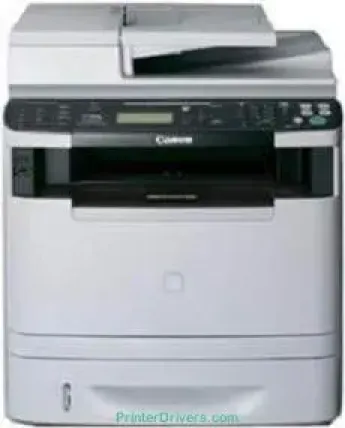
La tecnologia di stampa del modello Canon imageCLASS MF5980dw è la stampa laser monocromatica. Inoltre, la modalità di stampa predefinita della stampante è quella fronte-retro, potenziata dall'unità duplex. Per la stampa in bianco e nero, la velocità arriva a 17 pagine al minuto (ppm) nella stampa fronte-retro su carta comune formato lettera. Nella modalità solo fronte, la velocità arriva a 35 ppm per il formato lettera.
Driver Canon imageCLASS MF5980dw per Windows
81d6339680865efd19152b608fb9b58644636f42a33805cd13b9aeaa471c3faefc0846ec4b43c5d88533c876b7524e575552792c188d282bffe76fe822afcb904d55a4a3e3f5a130bc7a9ccfc5f72f91edf71646e99efe25e959fc74157e973fDriver Canon imageCLASS MF5980dw per macOS
d5f10278e0dd91a898757299adb4a566e5f14e6ad073c885da268768b7b8172ecb2272f8415b8ae2d217a69c680fcf669274d1d39f70cf62c30e3992ca077eefff5d80d992a0f8b003104ffdc1bdf36bfe8bce0aa49cce77b27cdc9a95a5776cacba8d1ff32f0bddfb05dd5f9adbd105580d1505801cc771b89f19bcbf5eac1e6708a180dad9484c82047dc4624ec4b3dd3438231e6ac5cbcdba793755e1ddb46b581313eec6df01b8ad51715b70513f5b2a2cb26467a41d34966d7b57f74f965efcaeccd8b1f1103d2bb966199a47fc50f0116996d987bd51178d61474c2151c98999b876d4bc8928e9adbfd33748039773dbb01850e711679363ae3e93785b8a9fe8a3ad9ee02fb65e10e05eda1e6d8e6ba268fa987a6e164d5ba661bb1240312dad7b42625ee423180149805c7ec4e10d238d7ee98b777e766374df0576c8917e7c7089148ed46d637656f66159b2042287e9084b2b921ae5b5f5c0eb0e4837c7892368c2313a0619c97b4f71f32be34757bfcc84538a957d6f23e43e81f0da6c9cbd85a75754061053b0cd0086f0297ea2f9d52a2bb0056fff1438bcff12b3a91af1f32651926bea385706e66a9224b8471985df9e1f9d051d98d6da7b6309431107d2b98a5c1a3d4ae6141590e902abf12a5f16be1d69712e8cfe9845590297641744ea447acd804af112d0693e6588ba52e03feaf0d3150446eb3e84f535dc19aa61aba625226444a79ce3488bb61f99b0c653d1abf054c9b471d5a1b394292469e0acf79d6f42d1ee69f08969d05241d73a3b0845a32aaa2fe1c08f5de65a67c44f07e8c6ecf20e167ae2d83d355023809358287d3a2badbce6507585319819327b889a34a931905184cbeb1e9c986e5d635fa77c88f5de1e424c30886321f7ffd7900bcf8e4b8ce99f0d3d7af91556b836e302306ae8a25a2e16df9d702b8d833f5f41ec87cd5b357b1b9ddd3bb3d1b09a3768321db602239d777492e6a48ab862ab2fa01c7793bae9776d4de130b89fe50e189ff8c78d1e5fa6183d9dd3f1b1c7dc175ab7cd4bb929f902c55966150a6a0273dbb36ccad0f146006a360e961225a3a218f8f019abb06cafb6699a0ae2279c20467a32e972a2b98b6d48161d9708c89c3e6582c1998ff8f43602df6e3a91aa8f4f1b5bfa1a7cd1078ace4e588538376ea06d8cebe6fcce2f0feef6a769b6be9f24e7f1db99f24bb06439d1dfee3689a7f3cbe7d777c61b1ed00ffd86dc8a01d1e3652cafab5bb14b9d7bba6d6ba05b0df3771569f21db0b854939d2854ce29f2f882cc1878c0b0de104fe09622cf352cfb39785875efcfde33a7f47cbaa88c59f92f1899529dd258692cb3630a8731182d0397d801cf7a93db0379115824defa2ab3781374fd4fa4cf02735f008f6d8f5882c2824e3f2b83f7ccf7de77a1e3cca3f3007e0d40da0aefDriver Canon imageCLASS MF5980dw per Linux
63d6d12d89e21430d0a906fcbedc849ca66c96352b13ebccdb8228a1d8810a3bCartucce toner supportate per Canon imageCLASS MF5980dw
Cartuccia toner nera CART319: fino a 2100 pagine
Cartuccia toner nera CART319II: resa fino a 6400 pagine
Specifiche
Il tempo necessario per stampare la prima pagina è di soli 6 secondi o anche meno quando si utilizza carta in formato letter. La risoluzione è inoltre fino a 600 x 600 punti per pollice (dpi), con una qualità di 1200 x 600 dpi. Il toner è compatibile anche con i modelli Canon Cartridge 119, che possono produrre fino a 2100 pagine. Un altro modello è la cartuccia ad alta capacità Canon Cartridge 119 II, che può produrre fino a 6400 pagine. Queste rese sono conformi agli standard ISO/IEC.
I formati carta compatibili includono letter, legal, A4, A5, B5, Statement e Executive. La stampante supporta carta comune, carta pesante, carta uso ufficio ed etichette. Sono compatibili anche schede e buste di tutti i tipi. La memoria interna è di 256 MB di RAM e memoria condivisa. Le modalità di stampa includono poster, opuscolo, filigrana, risparmio toner e composizione pagina.
Le specifiche della copiatrice includono una risoluzione di 600 x 600 dpi. La velocità può raggiungere 35 copie al minuto (CPM) su carta in formato letter. In modalità fronte-retro, la velocità di copia arriva a 17 CPM con la stessa tecnologia laser monocromatica. Le mezzetinte possono raggiungere 256 livelli; lo zoom è compreso tra 25 e 400%, con incrementi dell'1%. Per produrre la prima copia occorrono meno di 8 secondi.
Dettagli tecnici
| Titolo | Driver per Canon imageCLASS MF5980dw |
|---|---|
| Tipo di dispositivo | Stampante multifunzione |
| Versione del driver | Varia in base al driver e al sistema operativo |
| File disponibili da scaricare | Driver |
| Licenza | Gratuito |
| Produttore | Canon Inc. |