
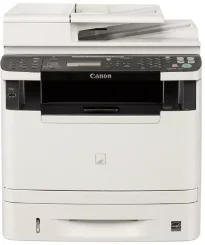
Il modello di stampante Canon imageCLASS MF5960dn è particolarmente adatto ai documenti in bianco e nero. Utilizza inoltre la tecnologia di stampa laser per produrre stampe di alta qualità. La modalità di stampa predefinita, ovvero quella duplex, stampa a una velocità di 17 pagine al minuto (ppm). In modalità simplex, o a una facciata, la stampa in bianco e nero raggiunge invece 35 ppm con carta in formato lettera.
Driver Canon imageCLASS MF5960dn per Windows
ed349f7a55ee5260a66cb33a78742b489f90257f131dad4e4ea77201dd2d55f1ce56495a06d538d860635fc9261badad508a8c777a4cb99cbb8774ede0b8ed904d55a4a3e3f5a130bc7a9ccfc5f72f91edf71646e99efe25e959fc74157e973fDriver Canon imageCLASS MF5960dn per macOS
b6ddb33c456e76b77c69654f2216908bce41d1c2f4c7b496f268dd5603748e09fff1780999685317a1609338aaf40ef1e54a4f5b750c252bf25d8acf357387b6db4bd12b92b8a2e9c7a25ac0d3bae568b640c30b1739dbb30a4fa5b89a977d2caf80abbfffc6c226407dfc5c2ea7fe751fb9c52c56dd4bf9a5cb587899b1368ff950b97366af1fb4a29ca5e58214d601da12098c39fbd8ff8c42f692cf8da1bb35223b2977d71ab373eafd6f14f28daa933cd2dcdc4b0d818da4a4432b14366879b3e920a4196ee4aaf6d17c5a095266ecf44e51626bd2902b01fa785dcd4075d5f10278e0dd91a898757299adb4a566e5f14e6ad073c885da268768b7b8172e0eb111d5cf4d5c62d6b9284027ec6281e368fed92dad0a18812530e0bc4faebeff5d80d992a0f8b003104ffdc1bdf36bfe8bce0aa49cce77b27cdc9a95a5776c02735f008f6d8f5882c2824e3f2b83f7ccf7de77a1e3cca3f3007e0d40da0aef86d5330d84af4dcc7458630c4999aae2495eebf5e1e3c6688e6e7c0453cb25a16708a180dad9484c82047dc4624ec4b3dd3438231e6ac5cbcdba793755e1ddb48a61b1860bb1be1d4e708f1419f7202262e29fb743bd1a4b7674daa6b74fce965efcaeccd8b1f1103d2bb966199a47fc50f0116996d987bd51178d61474c215169ef5f30da4c92762d2a5b614957892f1b542e16a07d53fec92f92bc3051fe328a9fe8a3ad9ee02fb65e10e05eda1e6d8e6ba268fa987a6e164d5ba661bb124090e2e6baaecf684360cf1130ec83b9d1c94718c339626db52f7b4688f9ce8f31917e7c7089148ed46d637656f66159b2042287e9084b2b921ae5b5f5c0eb0e48c5875b37125b8c8a32cad84148bab04417f7abf39551d213d21db0084be432ccddd1a155fe623f7f913e5bf860233ad73ccaaa5a5814b9b1e9353dd6501d88f7b3a91af1f32651926bea385706e66a9224b8471985df9e1f9d051d98d6da7b63c5310bca335d137d5d319b3536e7bd3bca38355c1bd03236c03a8c33fc0acd3e0297641744ea447acd804af112d0693e6588ba52e03feaf0d3150446eb3e84f535dc19aa61aba625226444a79ce3488bb61f99b0c653d1abf054c9b471d5a1b3f575641e457c67d6ab0291408154e09d5b5c40fee0413f8b74ebb8554db24d6fc18cb1be042fdd2ba53d1436d1118f2692f02d2b30388b52164994d355ae6aeae65a67c44f07e8c6ecf20e167ae2d83d355023809358287d3a2badbce6507585cd403b42f9117b3534b580cc059e657ae4f18497b4b9c846bd39602446daae286321f7ffd7900bcf8e4b8ce99f0d3d7af91556b836e302306ae8a25a2e16df9d702b8d833f5f41ec87cd5b357b1b9ddd3bb3d1b09a3768321db602239d777492e6a48ab862ab2fa01c7793bae9776d4de130b89fe50e189ff8c78d1e5fa6183d9dd3f1b1c7dc175ab7cd4bb929f902c55966150a6a0273dbb36ccad0f146006a95a8a167b29fa549e7cef6686d42491921d3db11307ee86a2b894730cbc5e9a7360e961225a3a218f8f019abb06cafb6699a0ae2279c20467a32e972a2b98b6d48161d9708c89c3e6582c1998ff8f43602df6e3a91aa8f4f1b5bfa1a7cd1078af3eb2eb16ece98af122e46ab88961d4c057c658e70b3441b239e996a75f0f9dece4e588538376ea06d8cebe6fcce2f0feef6a769b6be9f24e7f1db99f24bb064245023025e79196fe45e820e0d6ae054991fda6551b4a53e028cd1844354065fDriver Canon imageCLASS MF5960dn per Linux
d58796ee5518feee485119683cf7caa705668652803b8f0fb60177472ebe6d3bDownload dei driver Canon imageCLASS MF5960dn per Microsoft Windows 32-bit – 64-bit e Macintosh Operating System.
Dettagli della cartuccia toner: cartuccia toner nero 119 – resa di circa 2100 pagine
Il tempo necessario per stampare la prima pagina è di circa 6 secondi o meno con carta in formato lettera. La qualità di stampa media è di circa 600 x 600 punti per pollice (dpi). Al livello ottimale, la risoluzione per la migliore qualità di stampa arriva fino a 1200 x 600 dpi. La stampante multifunzione laser è compatibile con la cartuccia toner Canon modello 119, che può stampare fino a 2100 pagine con prestazioni ottimali.
Il modello Canon imageCLASS MF5960dn è compatibile anche con una versione ad alta capacità, che può stampare fino a 6400 pagine. Queste specifiche e questi valori sono conformi agli standard ISO/IEC. I formati carta compatibili includono lettera, legal, A4, B5, A5, statement ed executive. Il dispositivo è inoltre compatibile con carta comune, carta spessa per documenti, schede indice e buste.
I linguaggi compatibili con la stampante includono UFR II LT host-based, PCL 5/XL e l’emulazione PS 3. Le modalità di stampa includono poster, opuscolo, risparmio toner, composizione pagina e filigrana. La memoria di stampa interna condivisa è fino a 256 MB di RAM. Per quanto riguarda il peso della carta, l’intervallo supportato è compreso tra 16 e 32 lbs. Tuttavia, il vassoio multifunzione supporta un peso compreso tra 16 e 51 lbs quando si utilizza la cassetta principale.
Dettagli tecnici
| Titolo | Driver per Canon imageCLASS MF5960dn |
|---|---|
| Tipo di dispositivo | Stampante multifunzione |
| Versione del driver | Varia in base al driver e al sistema operativo |
| File disponibili da scaricare | Driver |
| Licenza | Gratuito |
| Produttore | Canon Inc. |