
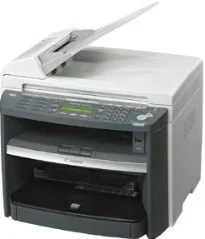
Canon imageCLASS MF4680 fa parte della serie di stampanti multifunzione Canon imageCLASS. È una stampante desktop personale con alimentazione interna a 220 e 240 volt. Il requisito di alimentazione, tuttavia, dipende dalla regione o dal paese in cui viene utilizzata la macchina. Il consumo energetico massimo della macchina durante il funzionamento è di 730 watt.
Driver Canon imageCLASS MF4680 per Windows
ee29e21d2e3b4d2bdbd790ab04328a94d53c51fe56b747284f3fddef1a1dadf0998788681c15a124724d0544205a748cc0404718488b5e6eb4fd8f03f0f9c9384d55a4a3e3f5a130bc7a9ccfc5f72f91edf71646e99efe25e959fc74157e973fa4353cbe30dcb9bbe268a738a20a90395fa7e7d76ebd1303b3404dbd8c82c435Driver Canon imageCLASS MF4680 per macOS
042821d27cddff8d35489be405be6fb6758a74e2357dcf8b86a6decc26d7aaefaaada4153be3b6cfa1ce7ebcf30b0758b1929a6ef8aea97857a0955911ce9e12fe736014202dd4dc2cc4b5618076a08306ebd2cadd738ee8c501bc1619fc19e75b8f8de010495b58464dd89bf0ec72e21a931f7476ebec8cf8c194361052d65735223b2977d71ab373eafd6f14f28daa933cd2dcdc4b0d818da4a4432b14366879b3e920a4196ee4aaf6d17c5a095266ecf44e51626bd2902b01fa785dcd40758c3891f63d4e6b9d23a613adb34a803bd4b45593d9fc0ca658465a0aba1a7ff3ff5d80d992a0f8b003104ffdc1bdf36bfe8bce0aa49cce77b27cdc9a95a5776c02735f008f6d8f5882c2824e3f2b83f7ccf7de77a1e3cca3f3007e0d40da0aefa2f4cd0e35483928ff487a3267ea5c930711de5d487220a3d3402f65c263e8e63cac8d47a0bb1580e74b492bc876858781092e8fae8a009946dc72a2194c0ca95efcaeccd8b1f1103d2bb966199a47fc50f0116996d987bd51178d61474c2151c98999b876d4bc8928e9adbfd33748039773dbb01850e711679363ae3e93785b3accb0f153300092a2ee312825c851035f1c66d65dafd67c77e2d4fbcd27c13a917e7c7089148ed46d637656f66159b2042287e9084b2b921ae5b5f5c0eb0e4837c7892368c2313a0619c97b4f71f32be34757bfcc84538a957d6f23e43e81f05c70ce408e9af249acb1d961605a3c4e4741913910cc53c3a562af0ca8c76e6ee9d00025aec26385cf22fcbd22ef4f1a7720267f938902aafc11822545bb49240297641744ea447acd804af112d0693e6588ba52e03feaf0d3150446eb3e84f501a221888cc3651a64f633e461870d1e2d0cce0ef54abb9c8317ca085ad21964e65a67c44f07e8c6ecf20e167ae2d83d355023809358287d3a2badbce6507585319819327b889a34a931905184cbeb1e9c986e5d635fa77c88f5de1e424c308822777e10690dcebdae80b6ec50e7bed2b28b71ca4cf9315646912ab2ad21c066e6a48ab862ab2fa01c7793bae9776d4de130b89fe50e189ff8c78d1e5fa6183d9dd3f1b1c7dc175ab7cd4bb929f902c55966150a6a0273dbb36ccad0f146006a39d1dfee3689a7f3cbe7d777c61b1ed00ffd86dc8a01d1e3652cafab5bb14b9dc0f30b290384f17a632ab8d1bb4aaeb3589d0088456996795300daf6874e757f4fe09622cf352cfb39785875efcfde33a7f47cbaa88c59f92f1899529dd25869ce4e588538376ea06d8cebe6fcce2f0feef6a769b6be9f24e7f1db99f24bb0642cb3630a8731182d0397d801cf7a93db0379115824defa2ab3781374fd4fa4cfDriver Canon imageCLASS MF4680 per Linux
dfd33db96aacd96ba06c0f5bfa11fa9f5d368ef520100c6e5abf900539592e7eDownload dei driver Canon imageCLASS MF4680 per Microsoft Windows 32-bit – 64-bit e sistema operativo Macintosh.
Dettagli della cartuccia toner: cartuccia toner FX9 nera: resa di circa 2000 pagine
Il dispositivo Canon imageCLASS MF4680 impiega meno di 16,0 secondi per riscaldarsi ed essere pronto per la stampa. La temperatura ambientale deve essere di 20°C e l'umidità relativa media del 65%. Il tempo di riscaldamento può variare anche in base alle condizioni della macchina e dell'ambiente. La macchina pesa circa 13,4 kg, cartuccia toner inclusa. Anche le altre dimensioni fisiche ne consentono l'uso in un ambiente tipico.
Ad esempio, la macchina Canon imageCLASS MF4680 è larga 473 mm, profonda 442 mm e alta 470 mm. Queste dimensioni tengono conto della presenza dell'alimentatore di documenti, della cassetta carta e del ricevitore opzionale collegato. Le condizioni ambientali prevedono inoltre una temperatura media compresa tra 7,5°C e 35°C. L'umidità relativa è compresa tra 5 e 90%, senza condensa.
Alcune delle lingue compatibili sono inglese, francese, tedesco, spagnolo, olandese, italiano, danese, ungherese, finlandese, norvegese, portoghese e slovacco. I tipi di carta compatibili includono carta comune, documenti spessi, carta fotografica, schede, carta da lucido e pellicole trasparenti. Il vetro di esposizione ha una larghezza massima di 216 mm e una lunghezza di 297 mm, con un peso medio di 2 Kg. Nell'alimentatore automatico di documenti (ADF), sono supportate grammature da 40 a 105 gsm. Questa funzione può gestire anche fino a 35 fogli di carta comune.
Dettagli tecnici
| Titolo | Driver per Canon imageCLASS MF4680 |
|---|---|
| Tipo di dispositivo | Stampante multifunzione |
| Versione del driver | Varia in base al driver e al sistema operativo |
| File disponibili da scaricare | Driver |
| Licenza | Gratuito |
| Produttore | Canon Inc. |