
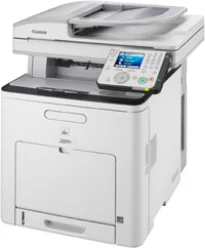
La stampante Canon i-SENSYS MF9280Cdn può stampare fino a 65.000 pagine al mese. Il tempo di riscaldamento del dispositivo è di massimo 60 secondi quando la macchina si riattiva dalla modalità di accensione. Dispone inoltre di una memoria interna condivisa con 768 MB di RAM. Il pannello di controllo ha un display TFT a colori con diagonale di 3,5 pollici, pari a circa 8,8 cm. Include anche una rotella di scorrimento.
Driver Canon i-SENSYS MF9280Cdn per Windows
ddc9e974d8d5e15a1ae4cb3117af56461467302ce79f7ffef638642848d0c3f4430a9479763a92c393c58516fbb6c784bd10d3fffea68e29aa3037967b6291a29a1afa2c3e1e35b01b97ed884bddd23829d707c44539bca6ece74547b87abae38d2fea082d8742dc83b719e15fe2f40b7b1f6b4989427ed5e97430f47623d7f3b1a5520fb7f652b0e9ee4b4a83e072327625e52ff281fbe0a70989f7ea07e5b04a9a1df9c5994c09b491bea55250c3a9803402f7cff710cb623807b64594e728c1bfad159d62fab63862a6fdf792c13be08ec542d9147d3c5d189b92cf117f05443586ca6d538a0ef5ddea5cb22db9c19a6e312885460e262c69793b2ffdd0e8e10fae91cdf20194edba025fa9bc08f0cee2ad0faaf22d9a8d30edde8f002cff9392ac4854b6611280a41af3b0273a86f621eaf21a1b98f60bb72df9a27a75089ff9d626f727260aac636225ad851eaf6cf3b03f80e18decd2f38217d4eae456d978ee6c4172ea568d6aae8fd3e874fa2096bf93ff90717e4fe34550fd75e3858ca59880d1cb5901be647cdf1caea23c100983180f08882aa439e2bb80f0478b9e0a235803be9f47a5d243d9335d0f9156f4db43c0d73229137365945e3a335e0deff56a0148d7027b8877556b7745d42c5813c7817e149c0897f3f537e54418cb339db25c05a3beb421ad1e31ab9601f64af4d7f5ac81885c067d86673faafb18012b4e3d9f4e36620ad4a72652f692fb8084fdd104e565bfabf3a44a89702bc8bb7c4afd1d14907fb5b41fe64d1bd2f0f0d5f570be7556c09a020a9ab7d698ecc2e2d13acf13111493bfce4e219b94e788771ce499f714ad883960c756c14c3dbaff462f856b55b98bc62ad910edf1d37eeaa36e99315d823fb455f11c7009bd8828daab14ec56a9e38bdea36fa9bf64ef4b79026cfa955cc0c1e777b97ad1Driver Canon i-SENSYS MF9280Cdn per macOS
042821d27cddff8d35489be405be6fb6758a74e2357dcf8b86a6decc26d7aaefb9037c1d57b4057417612c80a9f29487bb47edfb0266ba96c153717b6717b88cfe736014202dd4dc2cc4b5618076a08306ebd2cadd738ee8c501bc1619fc19e75b8f8de010495b58464dd89bf0ec72e21a931f7476ebec8cf8c194361052d657804989950b94f64b85160213d11a5259c082d1312c1f627a0812ee349ad6245f79b3e920a4196ee4aaf6d17c5a095266ecf44e51626bd2902b01fa785dcd4075602bdd48468bf971d46227aeb5a5e80268b4d63683acc1033092bf82e239f06404379ee4276dcb51d3d98f083a64cb6f006f980ebc7cfff7f3b862d6b83fb0ad0eb111d5cf4d5c62d6b9284027ec6281e368fed92dad0a18812530e0bc4faebe61f0115a742ccd592c97a829fdce66fb3936ba20e2c75c3a64b8fbf107dc5ff086d5330d84af4dcc7458630c4999aae2495eebf5e1e3c6688e6e7c0453cb25a1317cf79acc2b5c650f2d0487297a075500cf16bac82b4995036f450d7eb267a83cac8d47a0bb1580e74b492bc876858781092e8fae8a009946dc72a2194c0ca96b581313eec6df01b8ad51715b70513f5b2a2cb26467a41d34966d7b57f74f96c98999b876d4bc8928e9adbfd33748039773dbb01850e711679363ae3e93785b3accb0f153300092a2ee312825c851035f1c66d65dafd67c77e2d4fbcd27c13a312dad7b42625ee423180149805c7ec4e10d238d7ee98b777e766374df0576c837c7892368c2313a0619c97b4f71f32be34757bfcc84538a957d6f23e43e81f04c12283382997a0a253b5b7bedae90cf797892d245c51f896cbbc7eaf39f0d5bab8f0f303177d8c2129a2a2db2b478c6b63e40154d669f8d01041b4f7afcfbb1afa07a120e13f388f25264155b97228b6378ddc7bc4138e34904c730a8b43dcb0297641744ea447acd804af112d0693e6588ba52e03feaf0d3150446eb3e84f5400f046433591f4a0ff3c99e03208e8383398907c9703634230bd5670b241b6601a221888cc3651a64f633e461870d1e2d0cce0ef54abb9c8317ca085ad2196494292469e0acf79d6f42d1ee69f08969d05241d73a3b0845a32aaa2fe1c08f5d319819327b889a34a931905184cbeb1e9c986e5d635fa77c88f5de1e424c308822777e10690dcebdae80b6ec50e7bed2b28b71ca4cf9315646912ab2ad21c066702b8d833f5f41ec87cd5b357b1b9ddd3bb3d1b09a3768321db602239d7774929dd3f1b1c7dc175ab7cd4bb929f902c55966150a6a0273dbb36ccad0f146006aDriver Canon i-SENSYS MF9280Cdn per Linux
29e2380e21bda8c31f8c08435a2ba49cba61c13abfa47ba78081a9b0e55df333Download dei driver Canon i-SENSYS MF 9280Cdn per Microsoft Windows 32-bit – 64-bit e sistema operativo Macintosh.
Cartucce toner supportate
Cartuccia di toner ciano 711: resa fino a 6000 pagine
La larghezza di stampa arriva fino a 546 mm; la profondità è di 527 mm. Questa macchina Canon i-SENSYS MF9280Cdn è alta 632 mm e pesa fino a 43,3 kg. In un ambiente di stampa tipico, la temperatura di esercizio è compresa tra dieci e 320C. Inoltre, l'umidità relativa supportata è compresa tra 20 e 80%, senza condensa. La macchina ha anche un'alimentazione interna con tensione compresa tra 220 e 240 volt a 50/60 Hz.
Lo scanner è a piano fisso ed è dotato di un alimentatore automatico di documenti fronte/retro (DADF). La stampante Canon i-SENSYS MF9280Cdn ha anche una capacità standard di alimentazione fino a 250 fogli di carta comune. Dispone inoltre di un vassoio multiuso che può contenere fino a 100 fogli e di un DADF con una capacità aggiuntiva di 50 fogli. I tipi di supporti compatibili includono carta comune, carta riciclata, carta spessa, pellicole trasparenti, buste ed etichette.
I formati dei supporti compatibili includono A4, A5, B5, legal, letter, executive, statement, buste e monarch. Per quanto riguarda la grammatura della carta supportata, l'intervallo è compreso tra 60 e 120 gsm per il vassoio principale. Nel vassoio multiuso, invece, la grammatura consigliata è compresa tra 60 e 176 gsm.
Dettagli tecnici
| Titolo | Driver per Canon i-SENSYS MF9280Cdn |
|---|---|
| Tipo di dispositivo | Stampante multifunzione |
| Versione del driver | Varia in base al driver e al sistema operativo |
| File disponibili da scaricare | Driver |
| Licenza | Gratuito |
| Produttore | Canon Inc. |