
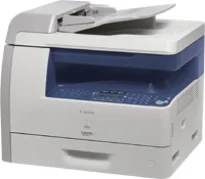
La stampante Canon i-SENSYS MF6560PL utilizza una tecnologia laser e uno scanner piano, ed è classificata come multifunzione. In altre parole, può stampare, acquisire, copiare e inviare fax con prestazioni ottimali. Il dispositivo dispone di uno scanner piano e di un alimentatore automatico di documenti (ADF). I linguaggi di stampa supportati includono PCL 5e, PCL 6 e GDI (Canon UFR-II LT). Tuttavia, tutte le specifiche sono conformi allo standard ISO/IEC19752.
Driver Canon i-SENSYS MF6560PL per Windows
1935881af93cac452434ae6eee37afbffe3ec482de5920cd5d5ad424a5a833b616e3b1cf3534fcf7d60feb3db5dc12cb5ee7137b02305e09470aea4f820ebb609e0a235803be9f47a5d243d9335d0f9156f4db43c0d73229137365945e3a335e4d55a4a3e3f5a130bc7a9ccfc5f72f91edf71646e99efe25e959fc74157e973fa4353cbe30dcb9bbe268a738a20a90395fa7e7d76ebd1303b3404dbd8c82c435Driver Canon i-SENSYS MF6560PL per macOS
21b6eacda90c61ccadc50d0d76781576b8fd553b4a671e3d386f78fad17253b4af80abbfffc6c226407dfc5c2ea7fe751fb9c52c56dd4bf9a5cb587899b1368f5b8f8de010495b58464dd89bf0ec72e21a931f7476ebec8cf8c194361052d65779b3e920a4196ee4aaf6d17c5a095266ecf44e51626bd2902b01fa785dcd4075602bdd48468bf971d46227aeb5a5e80268b4d63683acc1033092bf82e239f06404379ee4276dcb51d3d98f083a64cb6f006f980ebc7cfff7f3b862d6b83fb0ad86d5330d84af4dcc7458630c4999aae2495eebf5e1e3c6688e6e7c0453cb25a1317cf79acc2b5c650f2d0487297a075500cf16bac82b4995036f450d7eb267a83cac8d47a0bb1580e74b492bc876858781092e8fae8a009946dc72a2194c0ca9c98999b876d4bc8928e9adbfd33748039773dbb01850e711679363ae3e93785b3accb0f153300092a2ee312825c851035f1c66d65dafd67c77e2d4fbcd27c13a37c7892368c2313a0619c97b4f71f32be34757bfcc84538a957d6f23e43e81f04c12283382997a0a253b5b7bedae90cf797892d245c51f896cbbc7eaf39f0d5bab8f0f303177d8c2129a2a2db2b478c6b63e40154d669f8d01041b4f7afcfbb10297641744ea447acd804af112d0693e6588ba52e03feaf0d3150446eb3e84f501a221888cc3651a64f633e461870d1e2d0cce0ef54abb9c8317ca085ad21964400f046433591f4a0ff3c99e03208e8383398907c9703634230bd5670b241b66319819327b889a34a931905184cbeb1e9c986e5d635fa77c88f5de1e424c308822777e10690dcebdae80b6ec50e7bed2b28b71ca4cf9315646912ab2ad21c0669dd3f1b1c7dc175ab7cd4bb929f902c55966150a6a0273dbb36ccad0f146006aDriver Canon i-SENSYS MF6560PL per Linux
29e2380e21bda8c31f8c08435a2ba49cba61c13abfa47ba78081a9b0e55df333Download dei driver Canon i-SENSYS MF6560PL per Microsoft Windows 32-bit – 64-bit e Macintosh Operating System.
Cartucce toner supportate: cartuccia toner nero 706: resa fino a 5000 pagine
La velocità di stampa del dispositivo è di 22 pagine al minuto (ppm). Dispone di una memoria interna condivisa fino a 128 MB di RAM. La macchina può inoltre produrre fino a 15.000 pagine in un solo mese con una resa ottimale. La risoluzione di stampa è di 600 x 600 punti per pollice (dpi), mentre quella ottimale è di circa 1200 x 600 dpi grazie alla funzione di miglioramento automatico delle immagini (AIR).
La stampante Canon i-SENSYS MF6560PL è compatibile con la Cartridge 706, che consente di stampare fino a 5000 pagine. Per quanto riguarda la capacità dei vassoi della stampante, il vassoio principale può contenere fino a 500 fogli di carta comune. Oltre all'alimentazione principale, è presente un vassoio multiuso che può contenere fino a 100 fogli di carta comune. È inoltre disponibile una cassetta opzionale che può contenere fino a 500 fogli di carta comune. La larghezza massima di stampa è di circa 216 mm.
Il modello Canon i-SENSYS MF6560PL dispone di uno schermo a cristalli liquidi (LCD) che supporta 24 lingue. Le dimensioni fisiche della stampante sono circa 520 mm di larghezza e 420 mm di profondità. L'altezza è di circa 451,9 mm e il peso è di circa 23,7 kg. L'alimentazione supporta una tensione compresa tra 200 e 240 volt CA. La frequenza è di circa 50/60 Hz.
Dettagli tecnici
| Titolo | Driver per Canon i-SENSYS MF6560PL |
|---|---|
| Tipo di dispositivo | Stampante multifunzione |
| Versione del driver | Varia in base al driver e al sistema operativo |
| File disponibili da scaricare | Driver |
| Licenza | Gratuito |
| Produttore | Canon Inc. |