
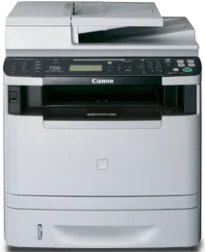
Questa stampante monocromatica utilizza la tecnologia di stampa laser per offrire la migliore combinazione possibile di velocità e qualità. In modalità solo fronte, stampa a una velocità fino a 35 pagine al minuto (ppm). La stampa fronte-retro, invece, raggiunge una velocità fino a 17 ppm; in entrambi i casi si utilizza carta formato Letter. Inoltre, il tempo di uscita della prima stampa è di circa 6 secondi o meno con un foglio formato Letter.
Driver Canon imageCLASS MF6180dw per Windows
184016cd9e1f14cdf636dcfb661a3549ed55e2821e57dd060812d4d24d216d7b184016cd9e1f14cdf636dcfb661a3549ed55e2821e57dd060812d4d24d216d7b04d2e8b6f97ecdbf6149ef728dccd1e27a7ad604327a8fa2972b7d5b6323ac325ce34dce406f36dd4468fa4e86676ad211a0ebe5026fd2007168c92b420d76518489588dc560880fa58e7af3f4a0b67d115b55dfbf3ee02e20ba4e64f1a399d30f9c6406c46b234f582a575d1581efe532fa405c5390a18408e0a3cd074c9611484d887fc334579b3dc3a8bc75da393a9e3965472a7d23778e61bd2de5b0bee24d55a4a3e3f5a130bc7a9ccfc5f72f91edf71646e99efe25e959fc74157e973fDriver Canon imageCLASS MF6180dw per macOS
b6ddb33c456e76b77c69654f2216908bce41d1c2f4c7b496f268dd5603748e09120d84051404d68ff23facc20ca6068b52d890770b6a9f100e82adfa5277a5aadb4bd12b92b8a2e9c7a25ac0d3bae568b640c30b1739dbb30a4fa5b89a977d2caf80abbfffc6c226407dfc5c2ea7fe751fb9c52c56dd4bf9a5cb587899b1368f35223b2977d71ab373eafd6f14f28daa933cd2dcdc4b0d818da4a4432b14366879b3e920a4196ee4aaf6d17c5a095266ecf44e51626bd2902b01fa785dcd4075d5f10278e0dd91a898757299adb4a566e5f14e6ad073c885da268768b7b8172edc0b747649fd9f72c6908765afdccac3720f84838bd6491360b431c69ee2fd6aff5d80d992a0f8b003104ffdc1bdf36bfe8bce0aa49cce77b27cdc9a95a5776c02735f008f6d8f5882c2824e3f2b83f7ccf7de77a1e3cca3f3007e0d40da0aef86d5330d84af4dcc7458630c4999aae2495eebf5e1e3c6688e6e7c0453cb25a16708a180dad9484c82047dc4624ec4b3dd3438231e6ac5cbcdba793755e1ddb46790fad87cfd6df48f74ed732c2c222f5baa62e7a17958b029f2efd102ce36315efcaeccd8b1f1103d2bb966199a47fc50f0116996d987bd51178d61474c215169ef5f30da4c92762d2a5b614957892f1b542e16a07d53fec92f92bc3051fe328a9fe8a3ad9ee02fb65e10e05eda1e6d8e6ba268fa987a6e164d5ba661bb1240e7931af2339fea2198ae845c6357e921538761f3610de796cbbf426d81eebfd3917e7c7089148ed46d637656f66159b2042287e9084b2b921ae5b5f5c0eb0e48c5875b37125b8c8a32cad84148bab04417f7abf39551d213d21db0084be432ccddd1a155fe623f7f913e5bf860233ad73ccaaa5a5814b9b1e9353dd6501d88f782479e45d013253d1629fa59133d3c05fa5002f39303f4f772912d334dc6f395c5310bca335d137d5d319b3536e7bd3bca38355c1bd03236c03a8c33fc0acd3e0297641744ea447acd804af112d0693e6588ba52e03feaf0d3150446eb3e84f535dc19aa61aba625226444a79ce3488bb61f99b0c653d1abf054c9b471d5a1b3e36a86682555814ab749d6fcc4df5ae336b34c5effd7760bbbc8330cb7e07d40e65a67c44f07e8c6ecf20e167ae2d83d355023809358287d3a2badbce6507585cd403b42f9117b3534b580cc059e657ae4f18497b4b9c846bd39602446daae286321f7ffd7900bcf8e4b8ce99f0d3d7af91556b836e302306ae8a25a2e16df9d272765a3f84315bd212c67b3fff1852f23a365abc5b0e061b1b5e25ed0dd811ae6a48ab862ab2fa01c7793bae9776d4de130b89fe50e189ff8c78d1e5fa6183d9dd3f1b1c7dc175ab7cd4bb929f902c55966150a6a0273dbb36ccad0f146006a360e961225a3a218f8f019abb06cafb6699a0ae2279c20467a32e972a2b98b6dcc86acf4b98a7844af468939d214f414650d54ea8d07c87841d2eafa2b285525ce4e588538376ea06d8cebe6fcce2f0feef6a769b6be9f24e7f1db99f24bb064Driver Canon imageCLASS MF6180dw per Linux
d58796ee5518feee485119683cf7caa705668652803b8f0fb60177472ebe6d3bDownload dei driver Canon imageCLASS MF6180dw per Microsoft Windows 32-bit – 64-bit e sistema operativo Macintosh.
Dettagli della cartuccia toner: cartuccia toner nera 119
Le opzioni includono l’emulazione PostScript, UFR II LT host-based, PCL6, 5e o XL tra i linguaggi di stampa compatibili. La risoluzione di stampa media è fino a 600 x 600 punti per pollice (dpi). La risoluzione di stampa ottimale può arrivare fino a 1200 x 600 dpi per ottenere la migliore qualità di stampa. Questa stampante Canon imageCLASS MF6180dw supporta anche il formato carta standard come formato carta massimo per il dispositivo.
Le altre opzioni possono includere filigrana, risparmio toner, composizione pagina e poster. Questa stampante dispone di una memoria interna condivisa di 256 MB di RAM ed è compatibile con i formati JPEG e TIFF. Essendo una stampante multifunzione, la Canon imageCLASS MF6180dw può anche copiare documenti con la stessa tecnologia laser monocromatica. La funzione di copia raggiunge una velocità di 35 copie al minuto con carta in formato lettera.
Per l’invio di fax, la velocità del modem della stampante arriva fino a 33,6 kbps con un processore Super G3. La risoluzione fax può arrivare a 400 x 400 dpi con la modalità ultra-fine. Il tempo di trasmissione in modalità JBIG è di circa 3 secondi e la memoria interna può contenere fino a 512 fogli. Sono inoltre disponibili fino a 19 selezioni rapide a un tocco e 181 selezioni codificate, per un massimo di 199 destinatari.
Dettagli tecnici
| Titolo | Driver per Canon imageCLASS MF6180dw |
|---|---|
| Tipo di dispositivo | Stampante multifunzione |
| Versione del driver | Varia in base al driver e al sistema operativo |
| File disponibili da scaricare | Driver |
| Licenza | Gratuito |
| Produttore | Canon Inc. |