
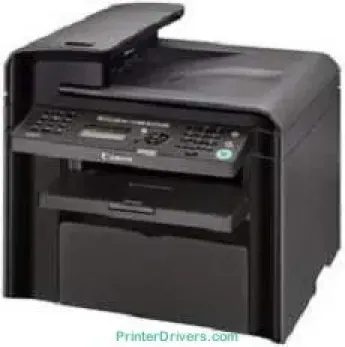
Con una macchina che supporta la stampa laser, come il modello Canon imageCLASS MF4380dn, gli utenti possono ottenere stampe di alta qualità grazie alla tecnologia digitale. Lo stato della stampante è visualizzato su un display a cristalli liquidi (LCD) di 2 righe e 16 caratteri. La stampante Canon imageCLASS MF4380dn può produrre fino a 10000 impressioni al mese, la sua capacità di stampa ottimale. È compatibile anche con la carta comune.
Driver Canon imageCLASS MF4380dn per Windows
e2b6db5b171233ba0ab4d0720f90cb1c06c06d6916d8a1ebb34c659c1819743ff26a15fe2b0a823ab0457ac78abd9703519ec0098b638a8726097ef57c4faf794d55a4a3e3f5a130bc7a9ccfc5f72f91edf71646e99efe25e959fc74157e973f6ff5709ce62d69c626744f47ee5d9ac22298eaa591df977fda163d0f563280df6ff5709ce62d69c626744f47ee5d9ac22298eaa591df977fda163d0f563280dfDriver Canon imageCLASS MF4380dn per macOS
6d0caac09d160afd7262d5d5b536d133a429e12b8f7c9f69373812e6356f34bdff5d80d992a0f8b003104ffdc1bdf36bfe8bce0aa49cce77b27cdc9a95a5776cacba8d1ff32f0bddfb05dd5f9adbd105580d1505801cc771b89f19bcbf5eac1e3cac8d47a0bb1580e74b492bc876858781092e8fae8a009946dc72a2194c0ca95efcaeccd8b1f1103d2bb966199a47fc50f0116996d987bd51178d61474c2151c98999b876d4bc8928e9adbfd33748039773dbb01850e711679363ae3e93785b3accb0f153300092a2ee312825c851035f1c66d65dafd67c77e2d4fbcd27c13a917e7c7089148ed46d637656f66159b2042287e9084b2b921ae5b5f5c0eb0e4837c7892368c2313a0619c97b4f71f32be34757bfcc84538a957d6f23e43e81f05c70ce408e9af249acb1d961605a3c4e4741913910cc53c3a562af0ca8c76e6ee9d00025aec26385cf22fcbd22ef4f1a7720267f938902aafc11822545bb49240297641744ea447acd804af112d0693e6588ba52e03feaf0d3150446eb3e84f501a221888cc3651a64f633e461870d1e2d0cce0ef54abb9c8317ca085ad21964e65a67c44f07e8c6ecf20e167ae2d83d355023809358287d3a2badbce6507585319819327b889a34a931905184cbeb1e9c986e5d635fa77c88f5de1e424c308822777e10690dcebdae80b6ec50e7bed2b28b71ca4cf9315646912ab2ad21c066e6a48ab862ab2fa01c7793bae9776d4de130b89fe50e189ff8c78d1e5fa6183d9dd3f1b1c7dc175ab7cd4bb929f902c55966150a6a0273dbb36ccad0f146006ac0f30b290384f17a632ab8d1bb4aaeb3589d0088456996795300daf6874e757fce4e588538376ea06d8cebe6fcce2f0feef6a769b6be9f24e7f1db99f24bb06439d1dfee3689a7f3cbe7d777c61b1ed00ffd86dc8a01d1e3652cafab5bb14b9d4fe09622cf352cfb39785875efcfde33a7f47cbaa88c59f92f1899529dd258692cb3630a8731182d0397d801cf7a93db0379115824defa2ab3781374fd4fa4cf02735f008f6d8f5882c2824e3f2b83f7ccf7de77a1e3cca3f3007e0d40da0aefDriver Canon imageCLASS MF4380dn per Linux
63d6d12d89e21430d0a906fcbedc849ca66c96352b13ebccdb8228a1d8810a3bCartucce toner supportate per Canon imageCLASS MF4380dn
Cartuccia toner nera Canon FX9: fino a 2000 pagine
Specifiche
La memoria interna della stampante è di circa 32 MB di RAM, per prestazioni di stampa ottimali. In modalità sospensione, il consumo energetico è di soli 3 watt. In modalità standby, il consumo è di circa 9 watt. Durante il funzionamento, il consumo energetico è invece di 650 watt al massimo delle prestazioni. I materiali di consumo per la stampa includono anche una cartuccia nera che produce fino a 2000 pagine.
La velocità di copia arriva a 22 pagine al minuto (ppm). La risoluzione massima di copia è di 600 x 600 punti per pollice (dpi), con 256 livelli di scala di grigi. Il tempo di riscaldamento è di circa 12 secondi, mentre la prima copia viene prodotta in soli 9 secondi. La macchina supporta inoltre la stampa fronte-retro automatica. Può anche produrre fino a 99 copie da un singolo documento originale, con una qualità ottimale.
Le modalità di esposizione includono foto, testo e una combinazione dei due. Oltre alle funzioni di copia generali, include anche le funzioni due pagine su una e risparmio toner. In quanto stampante certificata ENERGY STAR, la macchina è inoltre coperta da una garanzia hardware di un anno. La risoluzione di stampa massima raggiunge 1200 x 600 dpi ed è supportato UFRII LT. Durante la stampa, il motore produce un’emissione sonora di 63,5 dB.
Dettagli tecnici
| Titolo | Driver per Canon imageCLASS MF4380dn |
|---|---|
| Tipo di dispositivo | Stampante multifunzione |
| Versione del driver | Varia in base al driver e al sistema operativo |
| File disponibili da scaricare | Driver |
| Licenza | Gratuito |
| Produttore | Canon Inc. |