
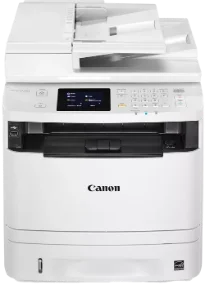
La stampa monocromatica con il modello Canon imageCLASS MF414dw offre risultati di alta qualità a una velocità eccezionale. La velocità arriva a 17 pagine al minuto (ppm) quando si stampa su entrambi i lati della carta. In modalità di stampa solo fronte, invece, arriva a 35 ppm. Il tempo di stampa della prima pagina è di circa 6,4 secondi o meno con carta formato Letter. I linguaggi di stampa supportati includono PCL 5c, PCL XL e UFR II basato su host.
Driver Canon imageCLASS MF414dw per Windows
c1c5055f92d0038dc413afca50da81a9b479a8e89030436dff52f367df0283efc1c5055f92d0038dc413afca50da81a9b479a8e89030436dff52f367df0283efd8e463505298f05934015f45615c10b5a46fd76a8891d9656d2715be490786a96e0231df2bc994176723bf67b28263786b2b3e6ac5df81286842a78a1c27114d0a54440677db13a6306081b5281edd2265717657d96e00e05d61cab0fd6ab0b7ab06b4ca4e6b96740e86bc83f313b9da6af77fed24ede730682fd05be1c26baf0d4f501e637282f476f558da6d428a536f40bdaf69f972730f29ca6ed53bfe02a2bc8d3788b40a988e601879c7178b38569e43ea26256cddb57d63fac655fdecc60ae7abde74362ee1fc65c30bd9d6dbd210613ae7713e332cb28ca73d2602cebb1077d07d7227f4ad228fb4e533fa207297ad682564f2a8f0fb15e49f3d2b9a7041e132bc8cb51f82da4f68b9431414fb5a3421b8eccf71b772c16d24b7a18557f0f872dd5399978d93341ed0cb55757a432d7fb27ad51a2da192a6b74d580e636afb70d89aad0eddbd50fb1d8a784344bf23a95c5f078a00be3d231680db8e04d2e8b6f97ecdbf6149ef728dccd1e27a7ad604327a8fa2972b7d5b6323ac325ce34dce406f36dd4468fa4e86676ad211a0ebe5026fd2007168c92b420d76518489588dc560880fa58e7af3f4a0b67d115b55dfbf3ee02e20ba4e64f1a399d30f9c6406c46b234f582a575d1581efe532fa405c5390a18408e0a3cd074c96112d97ead841d426ddb38a488cfe967b2b49aa89286fcf271af0ce96685b45ad2c041d82c9bcc80559e68ff68c6ba4ad4b306aa68506bf8ce00e71b99fdb985558cfe557946e69a58fbd83d2cf6ff6641be9e10624362f28ec6d414790303e17c6ec252ebd13b65d30d03910b256ba25720b7f8f84ab958a3e343a9ff44c0198f93ae3a9bec19da4981fa9ffa55ea4f53d8846c5a1f2e740bf9ee2b1e5f1a7507a427b89bc8d04fad2cd44ff669aa188f9c594e14fa7a4377a6036d303db7140f3484d887fc334579b3dc3a8bc75da393a9e3965472a7d23778e61bd2de5b0bee2208591d3c62613ef02343cfcd7f8c7c6b45dddefcf416acfa279ee14f3a9b8981323957bc0dfb873feb7615df02432e15cf188e7fe6cdcac00f6ac0d4566f71dbfe0eb5da0704a1ead08d62abcaad77b93dbe9887cbbef1220fe9ac8b47ffa0993fe1355abd4a92e1f64fd2c59ed2fadbd86a63ad22776f06d63b753f56541fc0793ccc7bbcb9b575bde84842a172c08ca890a97938e35b82d0ff7c8cb0379b5de56033f3245fcb34e2e7b291a7aaa4c5c3810bb3294ae9cbdf27e8908830120e28f9a1833e68475afc71d7ef976dd021c8b8cdf16b52839422c8e9cfc5b6ae9a1d0b961fdd798587bb750d58bd88e2d4d862e5c59dbd8da495333aaf3a7cd414d55a4a3e3f5a130bc7a9ccfc5f72f91edf71646e99efe25e959fc74157e973fDriver Canon imageCLASS MF414dw per macOS
b6ddb33c456e76b77c69654f2216908bce41d1c2f4c7b496f268dd5603748e09aaada4153be3b6cfa1ce7ebcf30b0758b1929a6ef8aea97857a0955911ce9e12fe736014202dd4dc2cc4b5618076a08306ebd2cadd738ee8c501bc1619fc19e735223b2977d71ab373eafd6f14f28daa933cd2dcdc4b0d818da4a4432b14366879b3e920a4196ee4aaf6d17c5a095266ecf44e51626bd2902b01fa785dcd4075d5f10278e0dd91a898757299adb4a566e5f14e6ad073c885da268768b7b8172eff5d80d992a0f8b003104ffdc1bdf36bfe8bce0aa49cce77b27cdc9a95a5776c86d5330d84af4dcc7458630c4999aae2495eebf5e1e3c6688e6e7c0453cb25a16708a180dad9484c82047dc4624ec4b3dd3438231e6ac5cbcdba793755e1ddb45efcaeccd8b1f1103d2bb966199a47fc50f0116996d987bd51178d61474c215169ef5f30da4c92762d2a5b614957892f1b542e16a07d53fec92f92bc3051fe328a9fe8a3ad9ee02fb65e10e05eda1e6d8e6ba268fa987a6e164d5ba661bb1240917e7c7089148ed46d637656f66159b2042287e9084b2b921ae5b5f5c0eb0e48c5875b37125b8c8a32cad84148bab04417f7abf39551d213d21db0084be432ccddd1a155fe623f7f913e5bf860233ad73ccaaa5a5814b9b1e9353dd6501d88f7c5310bca335d137d5d319b3536e7bd3bca38355c1bd03236c03a8c33fc0acd3e0297641744ea447acd804af112d0693e6588ba52e03feaf0d3150446eb3e84f535dc19aa61aba625226444a79ce3488bb61f99b0c653d1abf054c9b471d5a1b3e65a67c44f07e8c6ecf20e167ae2d83d355023809358287d3a2badbce6507585cd403b42f9117b3534b580cc059e657ae4f18497b4b9c846bd39602446daae286321f7ffd7900bcf8e4b8ce99f0d3d7af91556b836e302306ae8a25a2e16df9de6a48ab862ab2fa01c7793bae9776d4de130b89fe50e189ff8c78d1e5fa6183d9dd3f1b1c7dc175ab7cd4bb929f902c55966150a6a0273dbb36ccad0f146006aDriver Canon imageCLASS MF414dw per Linux
d58796ee5518feee485119683cf7caa705668652803b8f0fb60177472ebe6d3bScarica i driver di imageCLASS MF414dw per Microsoft Windows 32-bit – 64-bit e per il sistema operativo Macintosh.
Dettagli della cartuccia toner: cartuccia toner nera 119
Il modello di stampante Canon imageCLASS MF414dw può stampare con una risoluzione fino a 1200 x 600 punti per pollice (dpi). Il formato massimo della carta è 8,5 x 14 pollici e la stampante supporta la stampa fronte/retro. Le modalità di stampa disponibili includono poster, opuscolo, risparmio toner e composizione della pagina. Il dispositivo dispone inoltre di 1 GB di memoria condivisa interna e supporta i formati di file JPEG, TIFF e PDF.
Le specifiche di copia di questa macchina Canon imageCLASS MF414dw indicano che la risoluzione e la velocità sono uguali per la stampa e la copia. I tipi di file originali supportati includono testo, foto o una combinazione di entrambi. La macchina offre 256 livelli di mezzitoni; il tempo di riscaldamento dalla modalità di accensione è di circa 16 secondi. Il tempo per la prima copia è di circa 10 secondi o meno, mentre il tempo di ripristino è di 5 secondi o meno.
La velocità del modem della macchina arriva a 33,6 kbps con il processore Super G3. Questa modalità offre una risoluzione fax di 406 x 391 punti per pollice (dpi) nella modalità ultra-fine. La trasmissione richiede fino a 3 secondi per pagina, utilizzando tutti i componenti necessari.
Dettagli tecnici
| Titolo | Driver per Canon imageCLASS MF414dw |
|---|---|
| Tipo di dispositivo | Stampante multifunzione |
| Versione del driver | Varia in base al driver e al sistema operativo |
| File disponibili da scaricare | Driver |
| Licenza | Gratuito |
| Produttore | Canon Inc. |