
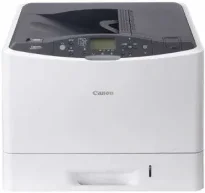
La stampante Canon imageCLASS LBP841Cdn può produrre fino a 75.000 pagine stampate al mese. Le specifiche generali includono una memoria del dispositivo di 512 MB di RAM e un pannello operativo con schermo LCD a 5 righe. Le dimensioni fisiche includono una larghezza di 545 mm e una profondità di 591 mm. L'altezza del dispositivo può raggiungere 361,2 mm, mentre il peso può arrivare fino a 34 kg.
Driver Canon imageCLASS LBP841Cdn per Windows
d8e463505298f05934015f45615c10b5a46fd76a8891d9656d2715be490786a96e0231df2bc994176723bf67b28263786b2b3e6ac5df81286842a78a1c27114d0a54440677db13a6306081b5281edd2265717657d96e00e05d61cab0fd6ab0b7ab06b4ca4e6b96740e86bc83f313b9da6af77fed24ede730682fd05be1c26baf0d4f501e637282f476f558da6d428a536f40bdaf69f972730f29ca6ed53bfe02a2bc8d3788b40a988e601879c7178b38569e43ea26256cddb57d63fac655fdec64e44aa350b529a66bd231af6902423a022db12268f6c535a88e9095473bd9fb23d81f5345fe18341a46cda9685998ac34bb4e9d83646bb5db3f3031bed8d400c60ae7abde74362ee1fc65c30bd9d6dbd210613ae7713e332cb28ca73d2602ce03d06cd9ccd69ae52631051dd223d09446d268467e073d875d526e6836c6aabf59bca599d9dfe2fc4b60473538828c70aa797ba871b9a86c0299ac83ce6123e23f4fd16fa6cdc14b041014fb334ae000c9dd07b5fb4f1cff611920fe8a1fd1941f50404ce941c1de922df5a0ec3bd64a12d29816a5f744031ebcda6e0ac5aeef04d2e8b6f97ecdbf6149ef728dccd1e27a7ad604327a8fa2972b7d5b6323ac325ce34dce406f36dd4468fa4e86676ad211a0ebe5026fd2007168c92b420d76518489588dc560880fa58e7af3f4a0b67d115b55dfbf3ee02e20ba4e64f1a399d30f9c6406c46b234f582a575d1581efe532fa405c5390a18408e0a3cd074c96112d97ead841d426ddb38a488cfe967b2b49aa89286fcf271af0ce96685b45ad2c041d82c9bcc80559e68ff68c6ba4ad4b306aa68506bf8ce00e71b99fdb985558cfe557946e69a58fbd83d2cf6ff6641be9e10624362f28ec6d414790303e17c6ec252ebd13b65d30d03910b256ba25720b7f8f84ab958a3e343a9ff44c0198f93ae3a9bec19da4981fa9ffa55ea4f53d8846c5a1f2e740bf9ee2b1e5f1a7507a427b89bc8d04fad2cd44ff669aa188f9c594e14fa7a4377a6036d303db7140f3813d953b761ca70a8d70c2bdd2180478b09313620848f4b541c40880091153936a86d8853cc41e26974731a64e63139f24ef01c6bf602ec1a19c74bce55cae18484d887fc334579b3dc3a8bc75da393a9e3965472a7d23778e61bd2de5b0bee2Driver Canon imageCLASS LBP841Cdn per macOS
883486e9090fa71b21286a676ceb6794224b0e5126260c6bcab8be3f3bab9b039cb40f3853c3fade0a2f8063dfad5ffb6919e879b5b19968938321bd5c139db58c3891f63d4e6b9d23a613adb34a803bd4b45593d9fc0ca658465a0aba1a7ff33cac8d47a0bb1580e74b492bc876858781092e8fae8a009946dc72a2194c0ca93accb0f153300092a2ee312825c851035f1c66d65dafd67c77e2d4fbcd27c13a5c70ce408e9af249acb1d961605a3c4e4741913910cc53c3a562af0ca8c76e6e01a221888cc3651a64f633e461870d1e2d0cce0ef54abb9c8317ca085ad2196422777e10690dcebdae80b6ec50e7bed2b28b71ca4cf9315646912ab2ad21c066Driver Canon imageCLASS LBP841Cdn per Linux
dfd33db96aacd96ba06c0f5bfa11fa9f5d368ef520100c6e5abf900539592e7eCartucce toner supportate per Canon imageCLASS LBP841Cdn
Cartuccia toner nera 335: fino a 13.000 pagine; cartuccia ciano 335: circa 16.500 pagine; cartuccia magenta 335: fino a 16.500 pagine; cartuccia toner gialla 335: resa fino a 16.500 pagine; cartuccia toner nera 335E: circa 7000 pagine; cartuccia ciano 335E: fino a 7400 pagine; cartuccia magenta 335E: fino a 7400 pagine; cartuccia toner gialla 335E: resa di circa 7400 pagine. Resa basata sullo standard ISO/IEC
Il consumo energetico massimo della stampante Canon imageCLASS LBP841Cdn è di circa 1420 watt o anche inferiore. Durante il funzionamento, il consumo è di circa 530 watt, mentre in modalità standby è di circa 22,5 watt. Quando la stampante è in modalità sospensione, il consumo con connessione USB è di circa 3 watt. Con una connessione LAN cablata, invece, il consumo è di circa 1,5 watt.
Inoltre, l'alimentazione richiesta dalla macchina Canon imageCLASS LBP841Cdn è compresa tra 220 e 240 volt a 50/60 Hz. L'ambiente operativo richiede una temperatura compresa tra 10 e 30°C. Per quanto riguarda l'umidità relativa, l'intervallo consigliato è compreso tra 20 e 80%, senza condensa. La cartuccia toner compatibile è il modello standard nero 33SE, che produce 7000 pagine incluse.
La cartuccia corrispondente, che stampa in giallo, magenta e ciano, è il modello 33SE, con una capacità di stampa di 7400 pagine. Le cartucce ad alta resa includono il modello 335 per 13000 pagine e il modello 335 per 16.500 pagine. La stampa su carta A4 in bianco e nero e a colori raggiunge circa 26 pagine al minuto (ppm). Su carta A3, invece, la velocità è di circa 15 ppm sia per la stampa in bianco e nero sia per quella a colori. La risoluzione di stampa minima è di 600 x 600 punti per pollice (dpi), mentre la qualità di stampa massima è di 9600 x 600 dpi.
Dettagli tecnici
| Titolo | Driver per Canon imageCLASS LBP841Cdn |
|---|---|
| Tipo di dispositivo | Stampante |
| Versione del driver | Varia in base al driver e al sistema operativo |
| File disponibili da scaricare | Driver |
| Licenza | Gratuito |
| Produttore | Canon Inc. |