
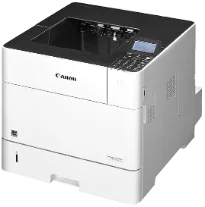
Il modello Canon imageCLASS LBP352dn è un altro eccellente prodotto dedicato esclusivamente alla stampa. Utilizza la tecnologia di stampa laser, che garantisce risultati ottimali per i documenti in bianco e nero. La velocità di stampa in monocromia è di 65 pagine al minuto (ppm) per la stampa di una singola pagina. In modalità fronte/retro, la velocità di stampa dei documenti in bianco e nero è di circa 43 ppm.
Driver Canon imageCLASS LBP352dn per Windows
17f862054d9e4b1e02c3b7e69f25fd87368953856cef81b172fc10104d2ec57e7311cbea1ccd079ace89b0024580fdbdf260d7db2a7fa60099b0144936b18e500d4f501e637282f476f558da6d428a536f40bdaf69f972730f29ca6ed53bfe02a2bc8d3788b40a988e601879c7178b38569e43ea26256cddb57d63fac655fdec417eb8282d38ebb1ed1a7958a2b141ed81f7beb71dd87c08421b9d4082fec834fc5a487dc2c4b5931201355b3424891276dc9d45f801c91e21ce03b1ad5c231bc60ae7abde74362ee1fc65c30bd9d6dbd210613ae7713e332cb28ca73d2602cebb1077d07d7227f4ad228fb4e533fa207297ad682564f2a8f0fb15e49f3d2b9a7041e132bc8cb51f82da4f68b9431414fb5a3421b8eccf71b772c16d24b7a18557f0f872dd5399978d93341ed0cb55757a432d7fb27ad51a2da192a6b74d580e636afb70d89aad0eddbd50fb1d8a784344bf23a95c5f078a00be3d231680db8e04d2e8b6f97ecdbf6149ef728dccd1e27a7ad604327a8fa2972b7d5b6323ac3278dba4149b6223898c28c095d1c88859ed1ae9aeab6f3521c2d54ebfd0c972b62351d02b585f408482068bf227d77bc186c7f29b3ce31f22340dfa26bf62a80984c3f334b0f856222b8eed352c7ba34b7b81539648effe54499b3e74fab8d5590cbcdc48fadbe7ec928ffd8b05bb6813ea056ad9d4b3e7473fa76dd1f5d1de7262814c49ae0caf9cce45a46e56a251fc5a3590abad2b4ce28b41d0bc591b89a0718da3e0d2ed9e4a733cf17978feb753b4d1893c6592e3b445e0d563083f9f2a5ce34dce406f36dd4468fa4e86676ad211a0ebe5026fd2007168c92b420d76518489588dc560880fa58e7af3f4a0b67d115b55dfbf3ee02e20ba4e64f1a399d30f9c6406c46b234f582a575d1581efe532fa405c5390a18408e0a3cd074c9611b61dc3d97292c5b398738861d93bde601e4bef0b6df07b51f038ac409ed9a979ba516521903a6d3f420ee99db46038790be4c52c00f08e5f40dadb4103727ee33ae3a9bec19da4981fa9ffa55ea4f53d8846c5a1f2e740bf9ee2b1e5f1a7507a427b89bc8d04fad2cd44ff669aa188f9c594e14fa7a4377a6036d303db7140f3208591d3c62613ef02343cfcd7f8c7c6b45dddefcf416acfa279ee14f3a9b8981323957bc0dfb873feb7615df02432e15cf188e7fe6cdcac00f6ac0d4566f71d484d887fc334579b3dc3a8bc75da393a9e3965472a7d23778e61bd2de5b0bee2Driver Canon imageCLASS LBP352dn per macOS
0f53fae19e0d86f5dad9e95bef02c8f9406769c635e54ac210c6d8ab9f8e11d3886eae36480408d8aaf4e0849ea9372a1021cbce0ea727fb33b622eaf3936af38c3891f63d4e6b9d23a613adb34a803bd4b45593d9fc0ca658465a0aba1a7ff3646aaa66b64a8416492c4abf846958b255a596204cbd7db738b975103f543f50120127e629c21787113c325d0a39041678f71d4a9f42e666ef90388f0c0584b58a61b1860bb1be1d4e708f1419f7202262e29fb743bd1a4b7674daa6b74fce96edd8dcff2593c749a946c421f8d3b7484ca2059b0e42799acf81f74ccc168efe90e2e6baaecf684360cf1130ec83b9d1c94718c339626db52f7b4688f9ce8f315c70ce408e9af249acb1d961605a3c4e4741913910cc53c3a562af0ca8c76e6eb3a91af1f32651926bea385706e66a9224b8471985df9e1f9d051d98d6da7b633d1cdceea84a542a2f3a87260766b5c9361b29b64316e7ff24d6a98a6826c68df575641e457c67d6ab0291408154e09d5b5c40fee0413f8b74ebb8554db24d6f22777e10690dcebdae80b6ec50e7bed2b28b71ca4cf9315646912ab2ad21c066702b8d833f5f41ec87cd5b357b1b9ddd3bb3d1b09a3768321db602239d777492Driver Canon imageCLASS LBP352dn per Linux
c0c2d391a4fd6e2f014a1e7e30a8cb20c7464112e1430532d3a5116f0cf648cbDownload dei driver imageCLASS LBP352dn per Microsoft Windows 32-bit – 64-bit e Macintosh Operating System.
Cartucce toner supportate: cartuccia toner 039: circa 11.000 pagine
Il tempo di stampa della prima pagina in modalità standby è di circa 7 secondi o meno, utilizzando carta in formato letter. La Canon imageCLASS LBP352dn può stampare con una risoluzione ottimale di 1200 x 1200 punti per pollice (dpi). La stampante può anche alternare le modalità di stampa toner saver, booklet, poster e watermark. La memoria interna per la stampa è fino a 1 GB. Il dispositivo supporta anche formati di protocollo standard, tra cui JPEG, TIFF, XPS e PDF.
In condizioni ideali, la cassetta principale della stampante può contenere fino a 500 fogli di carta comune. Per caricare altra carta, è possibile usare il vassoio multiuso, che può contenere fino a 100 fogli. I vassoi carta opzionali includono un vassoio con capacità di 500 fogli, un vassoio per supporti personalizzati da 450 fogli e un altro cassetto carta da 1500 fogli. L'ultima opzione compatibile è l'alimentatore da 75 fogli, che supporta anche fino a 200 formati di carta per cartoline.
Dopo la stampa, il vassoio di uscita della stampante può contenere fino a 500 fogli stampati. Il vassoio di uscita secondario può invece contenere fino a 100 fogli di carta comune. La stampante Canon imageCLASS LBP352dn supporta inoltre carta con grammatura compresa tra 16 e 32 lbs, se si utilizza carta uso mano o comune. La connettività è disponibile tramite la porta USB hi-speed 2.0 oppure la rete Ethernet 10/100/1000 Base-TX. La stampante è anche un'ottima scelta per la stampa da dispositivi mobili grazie al software e ai programmi preinstallati.
Dettagli tecnici
| Titolo | Driver per Canon imageCLASS LBP352dn |
|---|---|
| Tipo di dispositivo | Stampante |
| Versione del driver | Varia in base al driver e al sistema operativo |
| File disponibili da scaricare | Driver |
| Licenza | Gratuito |
| Produttore | Canon Inc. |