
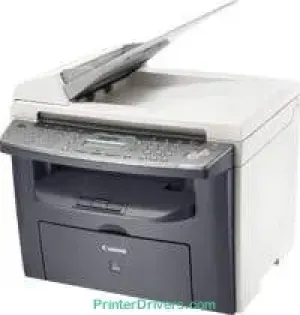
Il modello Canon i-SENSYS MF4350d è un dispositivo multifunzione con tecnologia di stampa laser digitale. Lo stato della stampante è visualizzato su uno schermo a cristalli liquidi (LCD) a due righe, in grado di mostrare fino a 16 caratteri. Il ciclo di lavoro mensile massimo della stampante è di 10.000 pagine o stampe. Il fax supporta anche la carta comune e dispone di una memoria interna da 32 MB.
Download del driver Canon i-SENSYS MF4350d per Microsoft Windows 32-bit – 64-bit e Macintosh Operating System.
Cartucce toner supportate
Cartuccia toner nera FX-10: resa di circa 2000 pagine
Driver Canon i-SENSYS MF4350d per Windows
b54a21a93e745b45af5f34d31f0583432c0f0cc12ed774ba4514fe21d83c0944e8408ba52503d5073734ce9d5eccc32362ae89f521450069b9a6f1a8ecfd5e514d55a4a3e3f5a130bc7a9ccfc5f72f91edf71646e99efe25e959fc74157e973fDriver Canon i-SENSYS MF4350d per macOS
0f53fae19e0d86f5dad9e95bef02c8f9406769c635e54ac210c6d8ab9f8e11d30485a03ef39ecfdf93f0d306d06db70162ec51ee6101b8b216a6bf379343eb35503619d05f501b7a04c15b3f849f415878d501725df252139d81841280c628e88c3891f63d4e6b9d23a613adb34a803bd4b45593d9fc0ca658465a0aba1a7ff3ff5d80d992a0f8b003104ffdc1bdf36bfe8bce0aa49cce77b27cdc9a95a5776ca2f4cd0e35483928ff487a3267ea5c930711de5d487220a3d3402f65c263e8e63cac8d47a0bb1580e74b492bc876858781092e8fae8a009946dc72a2194c0ca95efcaeccd8b1f1103d2bb966199a47fc50f0116996d987bd51178d61474c2151c98999b876d4bc8928e9adbfd33748039773dbb01850e711679363ae3e93785b3accb0f153300092a2ee312825c851035f1c66d65dafd67c77e2d4fbcd27c13a917e7c7089148ed46d637656f66159b2042287e9084b2b921ae5b5f5c0eb0e4837c7892368c2313a0619c97b4f71f32be34757bfcc84538a957d6f23e43e81f0ab8f0f303177d8c2129a2a2db2b478c6b63e40154d669f8d01041b4f7afcfbb109431107d2b98a5c1a3d4ae6141590e902abf12a5f16be1d69712e8cfe9845590297641744ea447acd804af112d0693e6588ba52e03feaf0d3150446eb3e84f501a221888cc3651a64f633e461870d1e2d0cce0ef54abb9c8317ca085ad21964e65a67c44f07e8c6ecf20e167ae2d83d355023809358287d3a2badbce6507585319819327b889a34a931905184cbeb1e9c986e5d635fa77c88f5de1e424c308822777e10690dcebdae80b6ec50e7bed2b28b71ca4cf9315646912ab2ad21c066e6a48ab862ab2fa01c7793bae9776d4de130b89fe50e189ff8c78d1e5fa6183d9dd3f1b1c7dc175ab7cd4bb929f902c55966150a6a0273dbb36ccad0f146006a602bdd48468bf971d46227aeb5a5e80268b4d63683acc1033092bf82e239f0644c12283382997a0a253b5b7bedae90cf797892d245c51f896cbbc7eaf39f0d5b400f046433591f4a0ff3c99e03208e8383398907c9703634230bd5670b241b665afe5cf7fb0b2760c08f60dbce40f1d5569a42ee8c5601b28c28fdbf74dd03b44fe09622cf352cfb39785875efcfde33a7f47cbaa88c59f92f1899529dd25869317cf79acc2b5c650f2d0487297a075500cf16bac82b4995036f450d7eb267a802735f008f6d8f5882c2824e3f2b83f7ccf7de77a1e3cca3f3007e0d40da0aefDriver Canon i-SENSYS MF4350d per Linux
b7031f9f0aa035cbc5175cb86e3bd83d06f90673a63ea40105ffb5cc6c60237fSpecifiche tecniche di Canon i-SENSYS MF4350d
In base allo standard previsto, il consumo energetico della stampante varia a seconda della modalità: circa 3 watt in modalità sospensione e 9 watt in standby. Quando è pienamente operativa, la stampante consuma 650 watt. La velocità di copia del modello arriva fino a 22 copie al minuto (CPM). Questa velocità si applica ai documenti in bianco e nero. La risoluzione di copia arriva fino a 600 x 600 dpi.
Per le mezzetinte in scala di grigi, la stampante supporta 256 livelli. Il tempo di riscaldamento è di 10 secondi. Il tempo di uscita della prima copia è di circa 9 secondi o meno. Il livello di zoom consente di ingrandire il documento fino al 200% e di ridurlo fino al 50%. Le modalità di esposizione supportano testo, foto o una combinazione dei due. Questa modalità di copia offre anche altre interessanti funzioni.
La stampa con il modello Canon i-SENSYS MF4350d offre una risoluzione massima in uscita fino a 1200 x 600 dpi. La velocità massima di stampa è di 22 ppm con supporto per i driver stampante o le emulazioni UFR II LT. In modalità operativa, la stampante produce un livello di rumore di 63,5 dB. Sono previste anche altre condizioni in cui la stampante può funzionare al meglio.
Dettagli tecnici
| Titolo | Driver per Canon i-SENSYS MF4350d |
|---|---|
| Tipo di dispositivo | Stampante multifunzione |
| Versione del driver | Varia in base al driver e al sistema operativo |
| File disponibili da scaricare | Driver |
| Licenza | Gratuito |
| Produttore | Canon Inc. |