
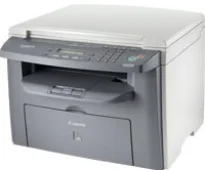
Canon i-SENSYS MF4018 è una macchina monocromatica che produce stampe di ottima qualità in bianco e nero. È anche una stampante multifunzione con funzioni di stampa, scansione e copia, pensata per offrire agli utenti la migliore esperienza. Con carta A4, la velocità di stampa è di 20 pagine al minuto in condizioni ideali. Utilizza la tecnologia di stampa laser monocromatica. La risoluzione media di stampa è di circa 600 x 600 punti per pollice (dpi).
Driver Canon i-SENSYS MF4018 per Windows
c5e0c5800de336a886d3a00666c6fe63349f806c56d4c5760c7ccfc2914a89aabffccb01935e0318cff45cfa393ed93874b0e4c3f6669668caa08335fb8b474d9e0a235803be9f47a5d243d9335d0f9156f4db43c0d73229137365945e3a335e4d55a4a3e3f5a130bc7a9ccfc5f72f91edf71646e99efe25e959fc74157e973f2a0359c5c0a5c6b5a93dfc61e36370ff55bed699e92dd69f5aa37d5a33b20f66Driver Canon i-SENSYS MF4018 per macOS
21b6eacda90c61ccadc50d0d76781576b8fd553b4a671e3d386f78fad17253b4db4bd12b92b8a2e9c7a25ac0d3bae568b640c30b1739dbb30a4fa5b89a977d2c5b8f8de010495b58464dd89bf0ec72e21a931f7476ebec8cf8c194361052d65735223b2977d71ab373eafd6f14f28daa933cd2dcdc4b0d818da4a4432b143668602bdd48468bf971d46227aeb5a5e80268b4d63683acc1033092bf82e239f06404379ee4276dcb51d3d98f083a64cb6f006f980ebc7cfff7f3b862d6b83fb0adff5d80d992a0f8b003104ffdc1bdf36bfe8bce0aa49cce77b27cdc9a95a5776c02735f008f6d8f5882c2824e3f2b83f7ccf7de77a1e3cca3f3007e0d40da0aef3cac8d47a0bb1580e74b492bc876858781092e8fae8a009946dc72a2194c0ca95efcaeccd8b1f1103d2bb966199a47fc50f0116996d987bd51178d61474c21513accb0f153300092a2ee312825c851035f1c66d65dafd67c77e2d4fbcd27c13a917e7c7089148ed46d637656f66159b2042287e9084b2b921ae5b5f5c0eb0e484c12283382997a0a253b5b7bedae90cf797892d245c51f896cbbc7eaf39f0d5bab8f0f303177d8c2129a2a2db2b478c6b63e40154d669f8d01041b4f7afcfbb109431107d2b98a5c1a3d4ae6141590e902abf12a5f16be1d69712e8cfe98455901a221888cc3651a64f633e461870d1e2d0cce0ef54abb9c8317ca085ad21964400f046433591f4a0ff3c99e03208e8383398907c9703634230bd5670b241b66e65a67c44f07e8c6ecf20e167ae2d83d355023809358287d3a2badbce6507585b1dd15c6aa590cbdbacae660a75d0e1a14606384a372d54bcf348e8cfe09839c22777e10690dcebdae80b6ec50e7bed2b28b71ca4cf9315646912ab2ad21c066e6a48ab862ab2fa01c7793bae9776d4de130b89fe50e189ff8c78d1e5fa6183dDriver Canon i-SENSYS MF4018 per Linux
29e2380e21bda8c31f8c08435a2ba49cba61c13abfa47ba78081a9b0e55df333Scarica i driver Canon i-SENSYS MF4018 per Microsoft Windows 32-bit – 64-bit e sistema operativo Macintosh.
Dettagli sulle cartucce toner
Cartuccia toner nera FX-10: resa: fino a 2000 pagine
La risoluzione massima di stampa di questa stampante arriva a 1200 x 600 dpi grazie al componente di miglioramento automatico dell'immagine (AIR). I linguaggi di stampa compatibili includono UFR II LT, essenziale per la stampa monocromatica. I margini di stampa sono di 6 mm sui lati superiore e inferiore del foglio. Sui lati sinistro e destro, invece, i margini arrivano a 5 mm. Il dispositivo dispone anche di una modalità di risparmio toner per mantenere prestazioni di stampa ottimali.
Secondo le specifiche di copia, il modello Canon i-SENSYS MF4018 può effettuare 20 copie al minuto (CPM), anche su carta A4. Il tempo necessario per stampare la prima copia è di circa 9 secondi o meno. Le modalità di copia disponibili sono testo, testo/foto, testo/foto+ e foto. Supporta inoltre la copia manuale su 1 o 2 lati e la funzione di copie multiple.
Per quanto riguarda le specifiche standard della carta, il vassoio principale può contenere 250 fogli di carta comune. Oltre al vassoio principale, la macchina dispone di uno slot di alimentazione manuale, che può accogliere un foglio alla volta. Il vassoio di uscita può contenere fino a 100 fogli stampati. I tipi di carta supportati includono carta comune, pesante e riciclata, lucidi, etichette e buste.
Dettagli tecnici
| Titolo | Driver per Canon i-SENSYS MF4018 |
|---|---|
| Tipo di dispositivo | Stampante multifunzione |
| Versione del driver | Varia in base al driver e al sistema operativo |
| File disponibili da scaricare | Driver |
| Licenza | Gratuito |
| Produttore | Canon Inc. |