
Scarica il driver corretto per il tuo sistema operativo.
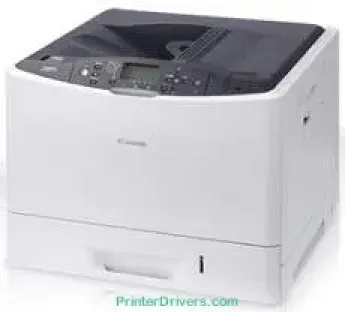
La Canon i-SENSYS LBP7780Cx stampa a una velocità di 32 pagine al minuto (ppm) per i documenti a colori e monocromatici. Supporta inoltre i formati carta A4, che rappresentano il formato massimo compatibile. Utilizza la tecnologia di stampa laser a colori per offrire prestazioni ottimali. La risoluzione di stampa media è di circa 600 x 600 punti per pollice (dpi) in condizioni normali.
Dettagli sulle cartucce toner
Cartuccia toner nera 732: circa 6100 pagine
Cartuccia toner ciano 732: fino a 6400 pagine
Cartuccia toner magenta 732: resa fino a 6400 pagine
Cartuccia toner gialla 732: fino a 6400 pagine
Driver Canon i-SENSYS LBP7780Cx per Windows
722506de3e384760645b007550c3f2f1af7e1add5a0055156fde565abab8558f68a34025554c17057ab6427a468c22e56546bd9b76a84c1dfaa96789cc6ed0978d2fea082d8742dc83b719e15fe2f40b7b1f6b4989427ed5e97430f47623d7f3bf31a4352cf32fa0d8e891013683895e8847cd8e45ec7e67cee6cbd139d15bf4e1b63536f7aa3f5115720ce607384aef4a407453dbf03842f1027b60b89e53fc4440d38430f90fcffc716e1b21f6acd10e0c1f5fdaa4bfcfdb4bcd957fcf89bc443586ca6d538a0ef5ddea5cb22db9c19a6e312885460e262c69793b2ffdd0e88ca59880d1cb5901be647cdf1caea23c100983180f08882aa439e2bb80f0478b9392ac4854b6611280a41af3b0273a86f621eaf21a1b98f60bb72df9a27a75089e0a235803be9f47a5d243d9335d0f9156f4db43c0d73229137365945e3a335ec1bfad159d62fab63862a6fdf792c13be08ec542d9147d3c5d189b92cf117f059a1afa2c3e1e35b01b97ed884bddd23829d707c44539bca6ece74547b87abae3e10fae91cdf20194edba025fa9bc08f0cee2ad0faaf22d9a8d30edde8f002cff0deff56a0148d7027b8877556b7745d42c5813c7817e149c0897f3f537e54418484d887fc334579b3dc3a8bc75da393a9e3965472a7d23778e61bd2de5b0bee204d2e8b6f97ecdbf6149ef728dccd1e27a7ad604327a8fa2972b7d5b6323ac320f9c6406c46b234f582a575d1581efe532fa405c5390a18408e0a3cd074c9611c60ae7abde74362ee1fc65c30bd9d6dbd210613ae7713e332cb28ca73d2602ceDriver Canon i-SENSYS LBP7780Cx per macOS
0f53fae19e0d86f5dad9e95bef02c8f9406769c635e54ac210c6d8ab9f8e11d3886eae36480408d8aaf4e0849ea9372a1021cbce0ea727fb33b622eaf3936af38c3891f63d4e6b9d23a613adb34a803bd4b45593d9fc0ca658465a0aba1a7ff3646aaa66b64a8416492c4abf846958b255a596204cbd7db738b975103f543f503cac8d47a0bb1580e74b492bc876858781092e8fae8a009946dc72a2194c0ca96b581313eec6df01b8ad51715b70513f5b2a2cb26467a41d34966d7b57f74f963accb0f153300092a2ee312825c851035f1c66d65dafd67c77e2d4fbcd27c13a312dad7b42625ee423180149805c7ec4e10d238d7ee98b777e766374df0576c8ab8f0f303177d8c2129a2a2db2b478c6b63e40154d669f8d01041b4f7afcfbb1afa07a120e13f388f25264155b97228b6378ddc7bc4138e34904c730a8b43dcb01a221888cc3651a64f633e461870d1e2d0cce0ef54abb9c8317ca085ad2196494292469e0acf79d6f42d1ee69f08969d05241d73a3b0845a32aaa2fe1c08f5d22777e10690dcebdae80b6ec50e7bed2b28b71ca4cf9315646912ab2ad21c066702b8d833f5f41ec87cd5b357b1b9ddd3bb3d1b09a3768321db602239d7774926e200a3b567a0471dfeff9cac88b8064afea21461705494bab47c96ceb7ebad4602bdd48468bf971d46227aeb5a5e80268b4d63683acc1033092bf82e239f06461f0115a742ccd592c97a829fdce66fb3936ba20e2c75c3a64b8fbf107dc5ff0Driver Canon i-SENSYS LBP7780Cx per Linux
b7031f9f0aa035cbc5175cb86e3bd83d06f90673a63ea40105ffb5cc6c60237fSpecifiche tecniche di Canon i-SENSYS LBP7780Cx
La funzione di miglioramento automatico delle immagini (AIR) consente inoltre di raggiungere una risoluzione fino a 9600 x 600 dpi. Il tempo di riscaldamento è di circa 39 secondi o meno dall'accensione. Per stampare la prima pagina di un documento in bianco e nero occorrono circa 10,2 secondi o meno. La prima pagina di un documento a colori richiede invece circa 10,4 secondi o meno. Il ciclo di lavoro della macchina Canon i-SENSYS LBP7780Cx è di 75.000 pagine al mese al livello ottimale.
Il margine di stampa su carta A4 è di circa 5 mm su tutti e quattro i lati del foglio. Per quanto riguarda la gestione dei supporti, il vassoio carta principale può contenere fino a 500 fogli di carta comune. Oltre al vassoio principale, la macchina dispone di un vassoio multiuso che può contenere 100 fogli di carta comune. Supporta anche un vassoio di alimentazione opzionale, che può contenere 500 fogli di carta comune.
Il vassoio di uscita può contenere fino a 200 fogli, con il lato stampato rivolto verso il basso. I tipi di supporto compatibili includono carta comune, carta riciclata, carta spessa, pellicole trasparenti, etichette e buste.
I formati dei supporti includono A4, A5, B5, Letter, Executive, Foolscap, 16K, Statement e Legal. Nella cassetta principale, la grammatura della carta supportata è compresa tra 60 e 163 gsm. Il vassoio multiuso supporta invece grammature comprese tra 60 e 216 gsm.
Dettagli tecnici
| Titolo | Driver per Canon i-SENSYS LBP7780Cx |
|---|---|
| Tipo di dispositivo | Stampante |
| Versione del driver | Varia in base al driver e al sistema operativo |
| File disponibili da scaricare | Driver |
| Licenza | Gratuito |
| Produttore | Canon Inc. |